
Change the game on a server: the Egg Changer, your portal between games
you move your server from one game to another (for example Minecraft to Palworld) with no new order, from the panel.
Before you start
- This is one of Portallis’s strengths: the same server can change portal (game) whenever you want. Your memory (€1 = 1 GB) stays the same. Check it is enough for the new game: Palworld or ARK need far more than a small Minecraft server.
- Back up your files (SFTP or file manager) first: switching game can delete your current files.
- The panel’s left menu adapts to the game: after our test, the “Minecraft” section (Extensions, Versions, Mods…) disappeared to make room for the new game’s menu.
Open the Egg Changer
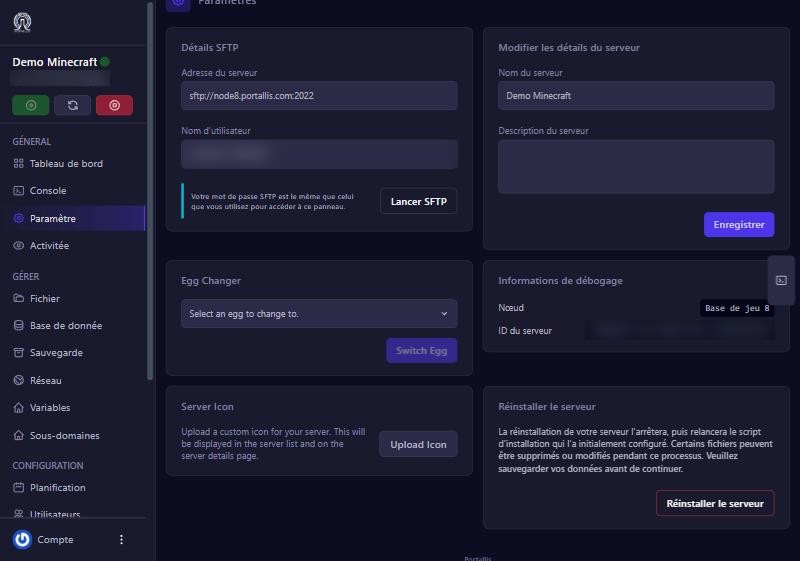
On the panel, open your server then Paramètre (Settings). The Egg Changer card (“Select an egg to change to”) holds a dropdown with more than fifty games (7 Days to Die, ARK Survival Ascended, Palworld, Hytale, Rust, Valheim, FiveM, several Minecraft versions…). Pick the game you want, then click Switch Egg.
Choose the two options
A “Switch to …” window opens with two switches, off to start with:
- Update Startup Command: after the switch, the server’s start-up command is replaced by the new game’s. Turn it on so the new game starts properly.
- Reinstall Server: the server is reinstalled so the new game’s files are in place. The window warns this deletes existing files. Turn it on to get a ready-to-play server.
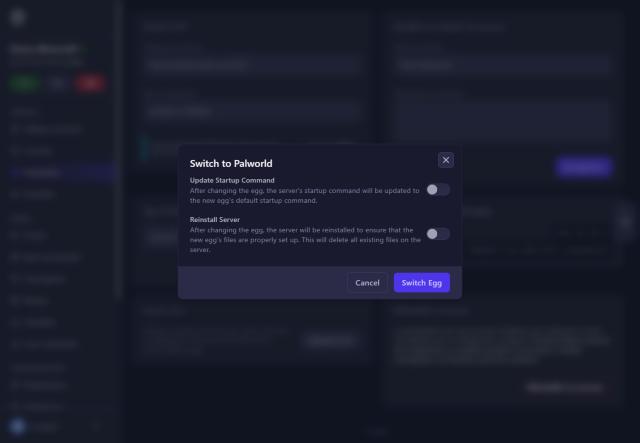
For a real game change, turn both on, then click Switch Egg.
Wait for the install
The server goes into install. Meanwhile, the file manager answers “This server is installing” (409). For Palworld, the install took about one to two minutes in our test. The panel then shows the new game’s menu.
Start and check
Click Start and read the Console: it should show the new game starting (for Palworld: “Running Palworld dedicated server”). Open Démarrage (Startup) to find the new game’s variables: name, password, player count, etc. Change the admin password if the game has one.
Clean up the old game
In our test, after the reinstall, folders from the old game (Minecraft) were still there (mods, world, start-up files). They do not bother the new game, but they take room: delete what is no longer useful in the file manager, without touching the new game’s folders.
If it does not work
The server does not start after the switch
check both switches were on. Otherwise, redo the switch with both options.
“Not enough memory” or a crash
the new game needs more memory than your plan. Change plan or game.
I lost my files
switching with reinstall can delete them. Restore your copy (backup or SFTP). With no copy, write to us.
The game I want is not in the list
it is not available with us yet; write to us, we add games according to demand.
Questions? Get in touch
Our team will answer by message or on Discord.