
Administer your Palworld server: admin password, commands and RCON
you secure the admin password, send commands from the panel console and in game, and manage your players.
Before you start
- An administrator can save, kick or ban players and stop the server. A password, to share with no one else, protects this role.
- Important: on a new Portallis Palworld server, the default admin password is the same for everyone (we saw it on the demo). Change it right away, before inviting players.
Change the admin password
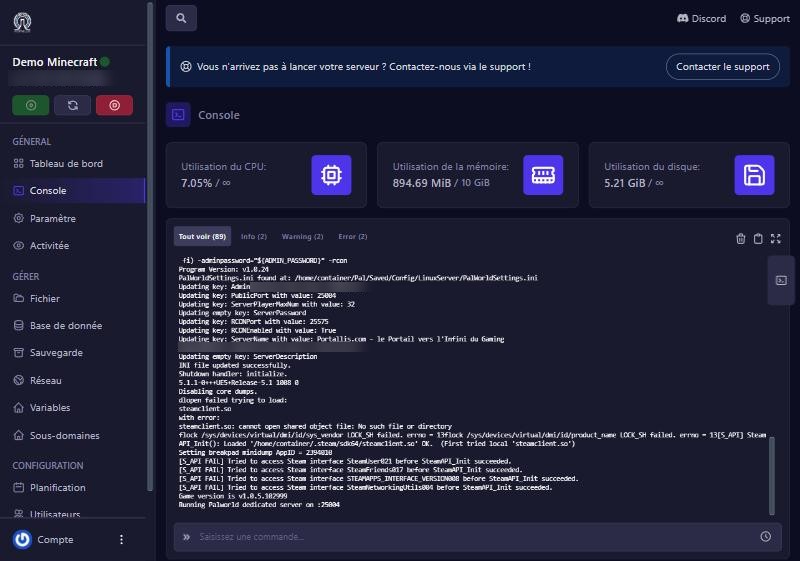
On the panel, open Démarrage (Startup) and find the Mot de passe administrateur (admin password) variable (“Password to type in the game chat or via RCON to get admin commands”). Enter a long, unique password, then restart. We tested it: after the restart, the configuration file held the new password. Careful: the start-up command, shown at the top of this screen, contains the password in clear. Do not share screenshots of this screen.
Send commands from the panel
In the Console, the “Saisissez une commande…” (enter a command) box is linked to your server through RCON: the panel handles it, no setup. Type the command without / then Enter:
Info: server version and name (tested: “Welcome to Pal Server…”).ShowPlayers: connected players (tested: returns the columns “name, playeruid, steamid”).Save: saves the world right away (tested).Broadcast message: announce to everyone (use dashes instead of spaces if the message gets cut).KickPlayer SteamIDandBanPlayer SteamID: kick or ban a player, using the Steam ID found withShowPlayers.Shutdown 60 message: stops the server after 60 seconds, warning players.
Be an administrator in game
In game, open the chat and type /AdminPassword followed by your password: you get admin commands for the session (/Save, /ShowPlayers, /KickPlayer…). The password must be typed again at each login.
Good habits
- Run
Savebefore restarting or stopping the server, so you lose no progress. - Schedule a nightly restart (see “Automatic restart”).
- Never publish the admin password, neither on Discord nor in a screenshot.
If it does not work
The command returns nothing
the server is not ready yet, or it is offline. Wait for “Running Palworld dedicated server” in the console.
In game: “incorrect password”
type exactly the one from Démarrage; if you changed it, restart the server first.
KickPlayer cannot find the player
use the Steam ID given by ShowPlayers, not the nickname.
I lost the password
change it in Démarrage and restart.
Questions? Get in touch
Our team will answer by message or on Discord.