
Set up your Palworld server: XP rate, capture, difficulty, PvP
you change your Palworld server’s rules (experience rate, capture, day speed, death, PvP) and know which settings go through the panel.
Before you start
- The game rules live in a file:
Pal/Saved/Config/LinuxServer/PalWorldSettings.ini. It is created at first start. A full template,DefaultPalWorldSettings.ini, sits at the server root: handy to find a setting’s name. - Palworld only re-reads this file at startup: stop the server before editing it, otherwise it may write over your changes.
- Make a backup of the file (copy it) before editing.
Open the file
In the panel’s file manager, open Pal, then Saved, Config, LinuxServer, and click PalWorldSettings.ini. All the content sits on a single line: OptionSettings=(Difficulty=None,…), with settings separated by commas. Do not split the line and do not delete any bracket or comma.
The most used settings
ExpRate: experience multiplier (1.0 by default; 2.0 doubles XP).PalCaptureRate: how easy catching Pals is.PalSpawnNumRate: number of Pals in the wild (raising it weighs on performance).DayTimeSpeedRateandNightTimeSpeedRate: day and night speed.DeathPenalty: what the player loses on death (for exampleItem).bEnablePlayerToPlayerDamage,bIsPvP: damage between players and PvP mode (off by default).BaseCampMaxNum,BaseCampWorkerMaxNum: number of bases and working Pals per base (15 by default).AutoSaveSpan: autosave interval (30 seconds by default on our server).
Decimal values are written as in the file (2.000000), yes/no values asTrueorFalse.
Edit, save, restart
Change a value, for example ExpRate=1.000000 to ExpRate=2.000000, save, then start the server. We tested it: after the restart, the file kept ExpRate=2.000000. Your other settings stay in place.
Settings managed by the panel
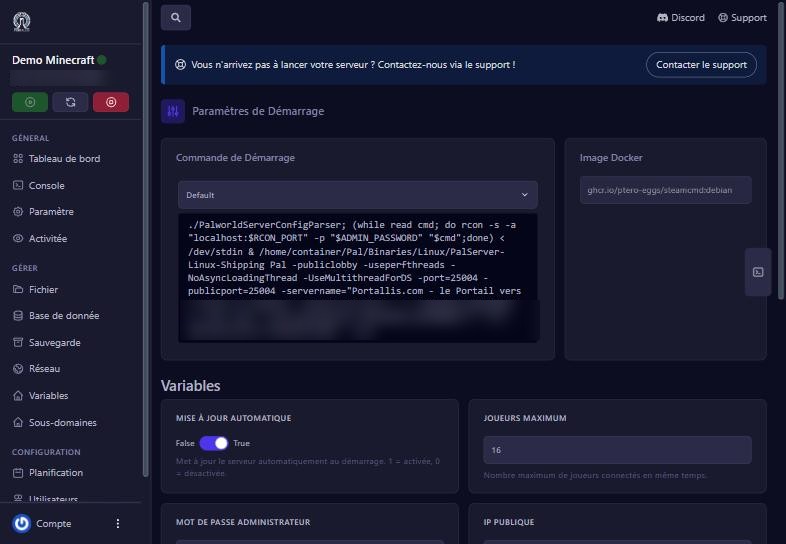
Some settings are rewritten at every start from the Démarrage (Startup) screen: the server name, server password, admin password, max players, the description, the public IP and the RCON port. Do not change them in the file: they would be overwritten. Change them in Démarrage (we checked: the player count and admin password changed in the panel appear in the file after restart).
If it does not work
My setting went back to the old value
it is a setting managed by Démarrage (name, passwords, max players); change it there. Or you edited the file while the server was running: stop, edit, restart.
The server no longer starts after my edit
a comma or bracket got lost. Put back the original line copied from DefaultPalWorldSettings.ini.
The setting has no effect in game
an existing world keeps some settings; restart and check the setting’s exact name (capitals count).
Questions? Get in touch
Our team will answer by message or on Discord.