
Join your ARK Survival Ascended server: start-up, address and password
you start your ARK Survival Ascended server, find its address and join it, with or without a password.
Before you start
- You need ARK: Survival Ascended, up to date. Do not mix it up with ARK: Survival Evolved, the older game: this guide covers Ascended.
- An ARK Ascended server is memory hungry: see the “ARK memory and performance” guide before choosing your plan.
- Your server’s address is on the panel dashboard: an IP and a port (for example
37.187.129.75:25004).
Start and wait
On the panel, click Start. The Console shows the loading: maps, extensions, then “Server … has successfully started!”. The first start takes from a few seconds to several minutes. When the server is ready, the panel connects to it over RCON (“waiting for rcon connection” messages, then “Waiting commands for …”).
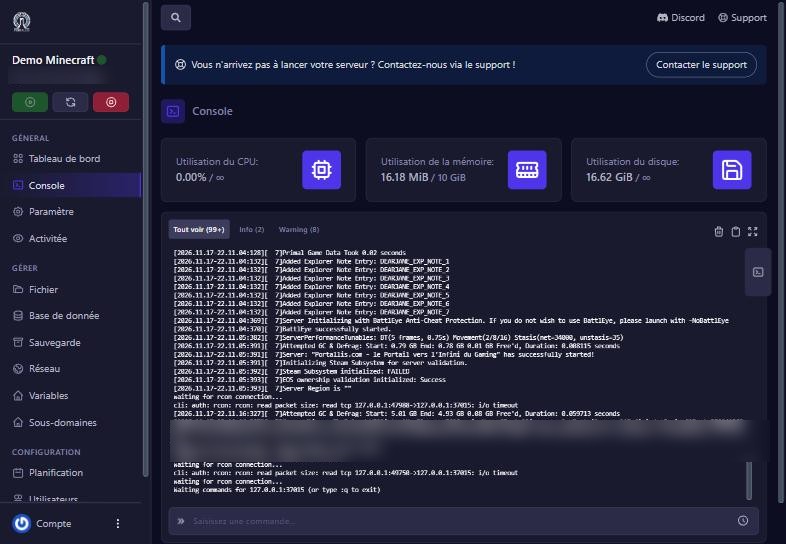
Set the name, map, password
Open Démarrage (Startup): you find clear variables.
- Nom du serveur (server name): the name shown in the “unofficial” server list.
- Mot de passe du serveur (server password): asked at entry; leave empty for a public server.
- Joueurs maximum (max players): up to 70 by default.
- Serveur PvE: 1 = player versus environment (default), 0 = PvP.
- Carte du serveur (map): the only map offered is
TheIsland_WP(The Island).
Restart the server after any change.
Join from the game
In ARK Ascended, open the unofficial servers list, search for your server’s name (turn on showing password-protected servers if needed), or use Join by IP with the panel’s address. If a password is set, enter it. For cross-platform play (crossplay), add the -crossplay option in “Arguments supplémentaires (options)” in Démarrage.
Does the server show up?
A new server can take a few minutes to appear in the list; joining by IP is immediate. If you cannot find the server, check it is online and that its console shows no stop.
If it does not work
The server stops or restarts by itself at start
likely a memory shortage. In our test at 10 GB, the server went above 10 GB then stopped. See “ARK memory and performance”.
“Incompatible version”
update the game and restart the server (Mise à jour automatique updates the server at every start).
Password refused
check the Mot de passe du serveur variable.
Cannot join by IP
check the full address, with the panel’s port, and that BattlEye matches (BattleEye variable: 1 = on).
The server stays “online” but does not answer
read the console; an RCON command returning “EOF” means the game stopped.
Questions? Get in touch
Our team will answer by message or on Discord.