
Install a modpack on your Minecraft server from the panel
you pick a modpack in the panel’s catalogue, choose its version and start its installation on your Minecraft server.
Before you start
- A modpack is a bundle of mods already chosen and tuned to work together (for example “Cobblemon” to play with Pokémon). Instead of adding mods one by one, you install everything at once. For a single mod, see the “Add a mod” guide.
- A modpack is built for one specific server type (Fabric, Forge or NeoForge): its name often says so, for example “[Fabric]”. Your server must be the same type: check the Versions screen (the line marked Current), see the “Choose your server version” guide.
- Your players must install the same modpack on their computer to join. Give them the link to the modpack page (the link icon next to its name).
- Stop the server before installing: otherwise the panel refuses (“The server must be offline before installing a modpack”). Note that in that case the screen only shows a generic error message, without this explanation.
- A modpack brings its own Minecraft version. Our test showed it: after installing a modpack built for 1.21.7, the Versions screen read “Fabric 1.21.7” instead of “Fabric 1.21.11”, and the server replaced its startup file at the next start. Your old mods (made for the old version) then no longer load: remove them before installing.
- Make a backup before installing, if your plan includes backups: installing changes the server’s files and the game version.
Open “Modpacks”
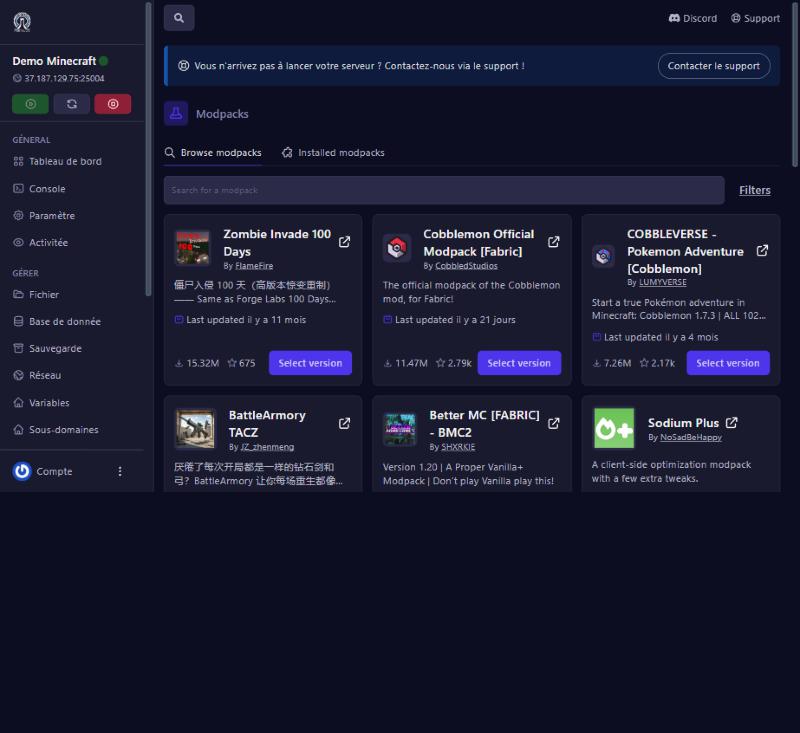
Modpacks menu (Minecraft section). Two tabs: Browse modpacks (the catalogue) and Installed modpacks (the ones installed; empty on a new server). Each card shows the author, a summary, the last update date, the download count and the rating.
Find the right modpack
Type a name in Search for a modpack, or browse the popular ones. The Filters button narrows the list. Look at the update date: a recently updated modpack usually follows the latest game versions.
Choose the version
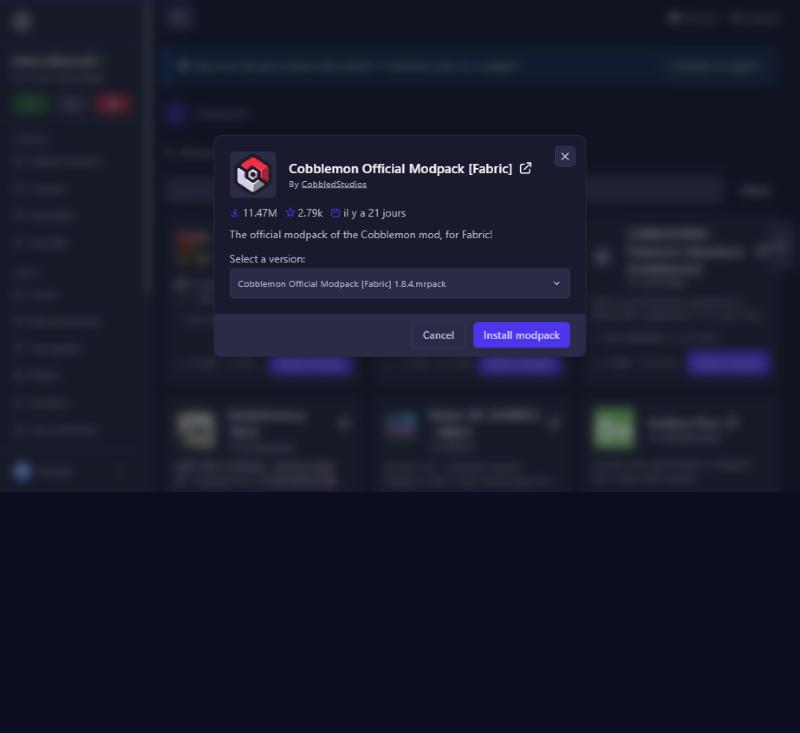
Click Select version under the modpack. A window opens with the modpack’s name, its statistics and the Select a version list: .mrpack files, newest first. The first line is the latest version; keep it unless your players already use an older one (they must match).
Install
With the server stopped, click Install modpack. Wait about a minute: the panel downloads the modpack then writes its files (in our test, several dozen mod files in the mods folder). The screen may show a connection error after 30 seconds while the install carries on: wait a minute, then check the mods folder in the file manager before trying again.
The Installed modpacks tab stayed empty after our install: do not rely on it to check, look at the mods folder.
Start and check
Start the server. In the Console, startup takes longer than an empty server: that is normal with many mods. Wait for the message saying the server is ready, then join with the same modpack. Also check the Versions screen: the Current card should show your modpack’s Minecraft version.
If it does not work
“Install would overwrite existing files” (the panel refuses to install)
a file from the modpack already exists on the server (for example config/lithium.properties). The panel does not overwrite it. Delete or rename that file in the file manager, then run the install again.
The server crashes at startup
the modpack does not match the server type (Fabric, Forge, NeoForge) or the game version, or old mods were left in the mods folder. Read the Console: the message says, for example, “requires version 1.21.7 of Minecraft, but only the wrong version is present: 1.21.11”. Delete the mods that do not belong to the modpack, or put the version you want back in Versions (see that guide).
Players are refused or see a mods error
their modpack version differs from the server’s. Have them install the same one.
The server is very slow or runs out of memory
big modpacks need more RAM. See your server’s plan on the game page.
I want to go back
restore the backup made before installing (see the “Backups” guide).
Questions? Get in touch
Our team will answer by message or on Discord.