
Join your Palworld server: address, password and common errors
you start your Palworld server, find its address, and join it from the game, with or without a password.
Before you start
- You need Palworld on Steam, up to date. A Palworld server only accepts players on the same game version as itself.
- Your server shows on the panel with an address: an IP followed by a port (for example
37.187.129.75:25004). The port is specific to your server. - To change the game on an existing server (for example from Minecraft to Palworld), see the “Change game” guide.
Start the server
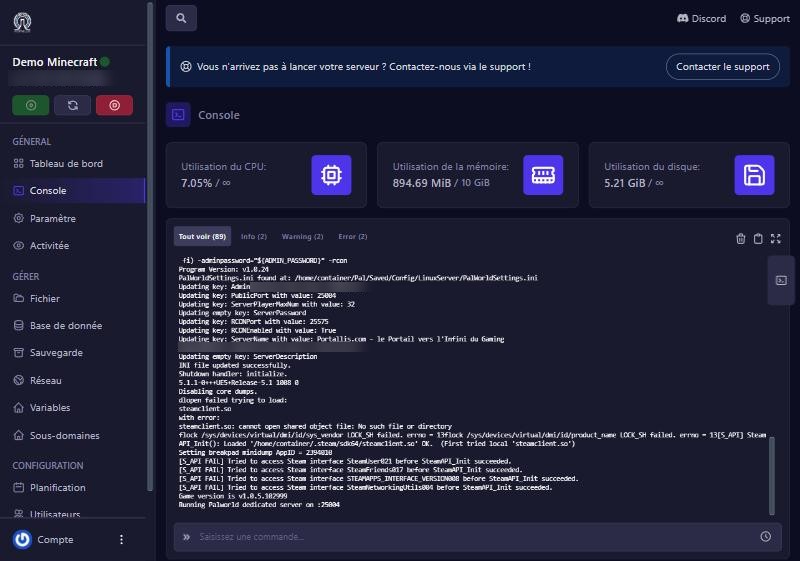
On the panel, open your Palworld server and click Start. In the Console, the panel first writes your settings (name, admin password, player count) into the configuration file, then launches the game. The server is ready when the console shows “Running Palworld dedicated server on :25004” (with your server’s port). Allow about a minute.
Check that the server answers
In the console’s command box, type Info then Enter. The server answers “Welcome to Pal Server”, followed by its version (for example v1.0.5) and the server name. If this answer comes, the server is running and takes admin commands.
Join from the game
In Palworld, choose Join Multiplayer Game. At the bottom of the screen, type the full address with the port (IP:port), then confirm. If a password is set, the game asks for it. You can also look for the server by name in the server list: it appears in the public list.
Set a password, a name, a slot count
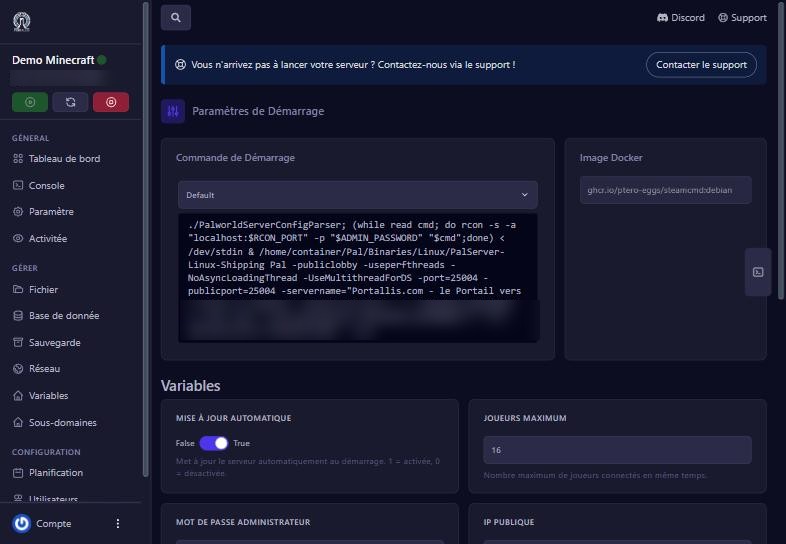
On the panel, open Démarrage (Startup): the Nom du serveur (server name), Mot de passe du serveur (server password: if filled in, players must type it) and Joueurs maximum (max players) variables apply at the next start. We tested it: after setting 16 players, the configuration file showed ServerPlayerMaxNum=16. Then restart the server.
If it does not work
“Incompatible version” or refusal just after a game update
the server is not up to date yet. The Mise à jour automatique (auto update) variable (on by default) updates the server at every start: restart it.
The server is not in the list
type its IP:port address by hand, or check it is online.
Password refused
check the Mot de passe du serveur variable in Démarrage (mind capitals and spaces).
The server is full
raise Joueurs maximum in Démarrage, then restart.
The console never shows “Running Palworld dedicated server”
read the last lines, then write to us with the console. See also “Reduce lag and manage memory”.
Questions? Get in touch
Our team will answer by message or on Discord.