
Reduce lag on a Minecraft server: the settings that matter
you spot the cause of a laggy Minecraft server (memory, view distance, plugins, mods) and apply the right settings.
Before you start
- Lag has two faces: players see blocks snapping back (the server is too slow, the “TPS” drops) or their game stutters (usually their computer or connection). This guide covers the first case.
- Minecraft aims for 20 “ticks” per second (TPS). Below that, the server cannot keep up.
- Make a backup before touching settings, if your plan includes backups.
Look at memory and processor
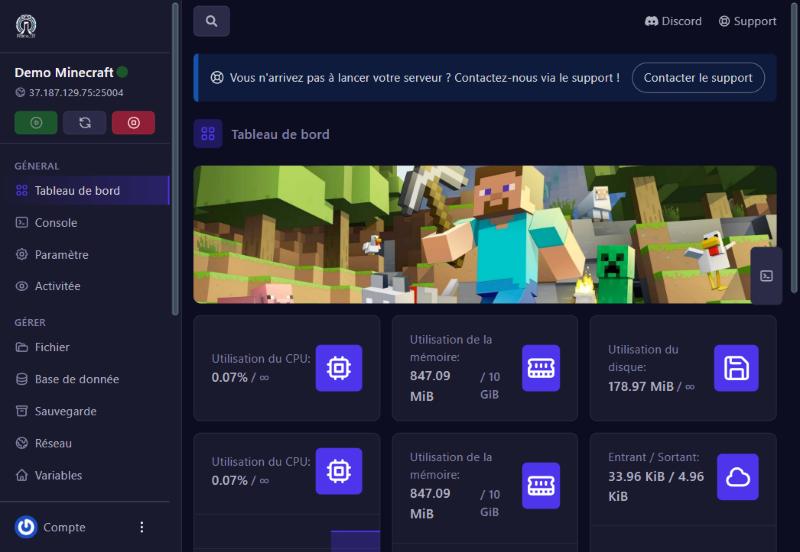
Open the server’s dashboard: it shows memory in use (for example 786 MB out of 10 GB) and the processor. If memory nears your plan’s maximum, the server is short of room: the number one cause of slowdowns on modded servers. A vanilla server for a few players uses little.
Lower the distances
On Properties, two settings weigh a lot, because the server computes everything inside that radius around each player:
- View Distance (in chunks): 10 by default. Go to 8, even 6 if the server is busy.
- Simulation Distance: 10 by default. Go to 6 or 8: far-away animals, crops and machines stop being computed.
Then restart the server, Minecraft does not re-read these settings live (see the “server.properties” guide).
Pick a lighter server
If you do not use mods, Paper (Versions screen) is usually faster than Vanilla thanks to its optimisations. For Fabric mods, an optimisation mod like Lithium, already on our demo, lightens the server. See “Choose your server version” and “Add a mod”.
Hunt the culprit
- Many players or big redstone builds: limit always-on machines.
- Too many entities: hundreds of animals or dropped items slow things down. Clean up giant farms.
- A greedy plugin or mod: remove the latest added one by one (see “Install a plugin”) and restart.
- A very large or old world: exploring creates millions of chunks; on a Paper server you can limit the size with the world border (
/worldborder set 5000).
Restart regularly
A restart frees accumulated memory. Schedule a nightly restart with a schedule (see “Automatic restart”).
If it does not work
It still lags after the settings
check memory on the dashboard; if it is full, move to a plan with more GB.
A crash or a “Can’t keep up!” in the console
the server fell behind (“Is the server overloaded?”). Note the time and what was going on, then write to us with the console.
My players see a smaller world after lowering distances
that is the expected effect of View Distance; find the right balance.
Questions? Get in touch
Our team will answer by message or on Discord.