
Minecraft admin commands: op, whitelist, ban
you become an operator on your server, manage the whitelist and ban a player, from the panel console.
Before you start
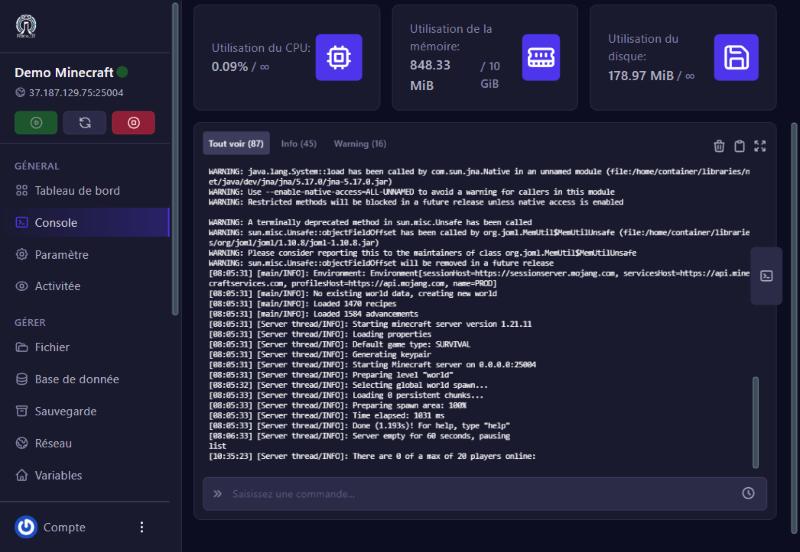
- Commands are typed in the panel’s Console (Console menu), in the “Saisissez une commande…” box (enter a command), without the in-game
/, then Enter. The server must be online. - An operator (“op”) can use admin commands in game (
/gamemode,/give,/tp, etc.). Only give this role to people you trust. - Your server checks accounts with Mojang (Online Mode on, the default): usernames must be real Minecraft accounts, spelled exactly.
Give yourself operator rights
In the console, type op YourUsername then Enter. We tested it: the server answers “Made … a server operator” and the username appears in the ops.json file (level 4, the highest). To remove the right: deop YourUsername.
Manage the whitelist
The whitelist keeps your server to your friends.
whitelist add Username: adds a player (tested: “Added … to the whitelist”, and the player shows inwhitelist.json).whitelist remove Username: removes them.whitelist list: shows the allowed players.whitelist on/whitelist off: turns the list on or off. Thewhite-listsetting also exists on the Properties screen.
Ban and kick
kick Username [reason]: removes a player, who can come back.ban Username [reason]: bans their account;pardon Usernamelifts the ban.ban-ip Address: bans an IP address;pardon-ip Addresslifts it.
Bans are stored inbanned-players.jsonandbanned-ips.json, visible in the file manager.
Everyday useful commands
say message (announce to everyone), list (connected players), gamemode creative Username (change mode), difficulty hard, time set day, weather clear, save-all (save the world), stop (stops the server cleanly). Commands also run in game with / once you are an operator.
If it does not work
“That player does not exist”
the username does not exist at Mojang, or is misspelled. We saw it with a fake username: the console also prints a “Couldn’t find profile with name” warning, which is not a crash. Copy the exact username.
The command has no effect
the server may be offline, or you typed in the wrong box (the console box, not the search).
A player refused despite the whitelist
check their username in whitelist.json and that the white-list setting is on.
An op without rights in game
their level is too low. In ops.json, level 4 gives every right.
Questions? Get in touch
Our team will answer by message or on Discord.