
you give a friend, a moderator or a developer access to your server with only the rights they need, without handing over your password.
Utilisateurs (Users) menu (Configuration section). The list shows each subuser’s name, email, creation date, expiration date and 2FA state (two-step verification). It is empty until you invite someone. Presets offers ready-made sets of rights, and Nouvel utilisateur opens the invitation.
Click Nouvel utilisateur and fill in:
Then Inviter l’utilisateur.
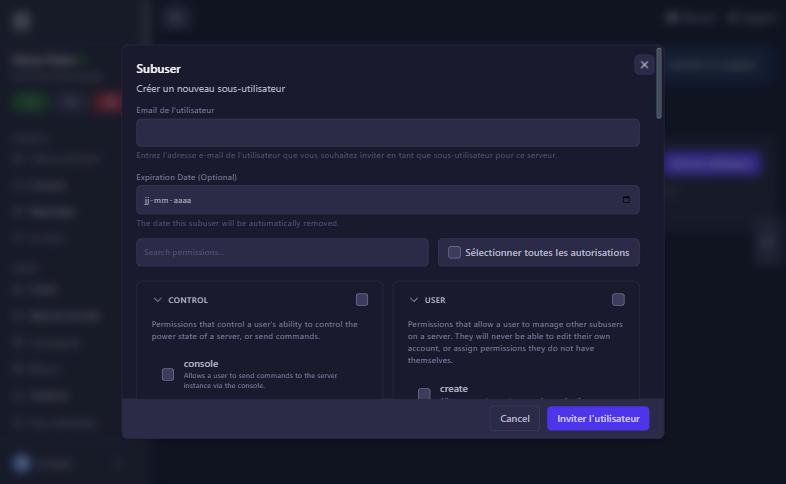
Rights come in ten groups. The most useful:
console (send commands), start, stop, restart. A moderator often needs only console and restart.read (see folders), read-content (read and download files), create, update, delete, archive, sftp (SFTP connection). A developer deploying files would have read, read-content, create, update and sftp.create, read, delete, download and restore. The panel warns that download gives access to all of the server’s files and restore can delete all files: keep them for trusted people.read, create, update (change a password), delete and view_password (see a database’s password).Principle: give the minimum. You can always add a right later.
In the list you can edit a subuser’s rights or delete them; access is removed immediately. Expiration dates apply on their own.
check the address and their spam folder.
the matching right is not ticked. Edit their rights.
delete the subuser in the list. Also change database passwords and the SFTP password if they had access.
also check the “Expiration date” column and the Activité log.
Our team will answer by message or on Discord.