
Panel account: security, two-step verification and keys

Step-by-step guide

you know how to set up your panel account, secure it (password, 2FA) and see who signed in.

Time : 5 minutesLevel : beginnerChecked : 17 Nov 2026

Before you start

  • The panel account is the one you use to sign in at panel.portallis.com. It gives access to your servers.
  • The panel keeps some English screens (“Account Settings”, “Security”…): tab names are quoted as they appear.
1

Open “Compte”

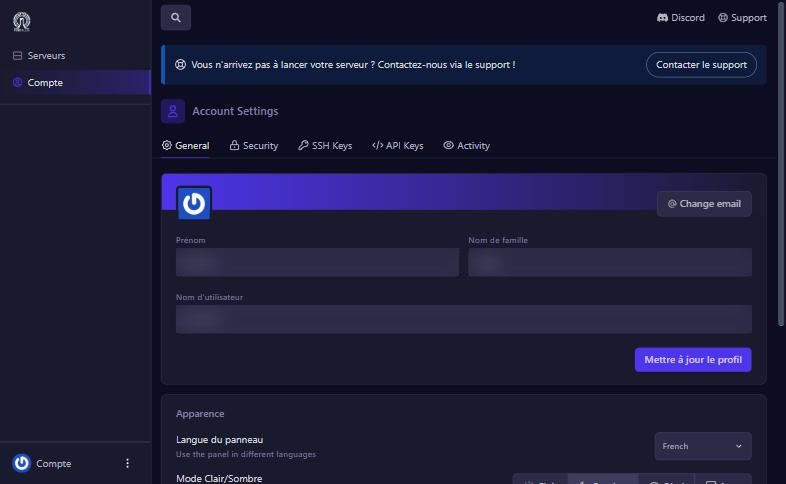
In the left menu (Servers page), click Compte. The Account Settings screen has five tabs: General, Security, SSH Keys, API Keys and Activity.
2

Set your profile and look (General)

  • Change email: change the account’s email address.
  • Prénom (first name), Nom de famille (last name), Nom d’utilisateur (username), then Mettre à jour le profil (update profile).
  • Apparence (appearance): Langue du panneau (panel language, English or French), Mode Clair/Sombre (Light, Dark, Oled, Auto), Display Mode (Normal or Compact), Sons du panneau (sounds), Mode Confidentialité (privacy mode: hides sensitive information, handy for a screenshot or a stream) and Animations.
Panel account: security, two-step verification and keys : General tab
General tab
3

Secure the account (Security)

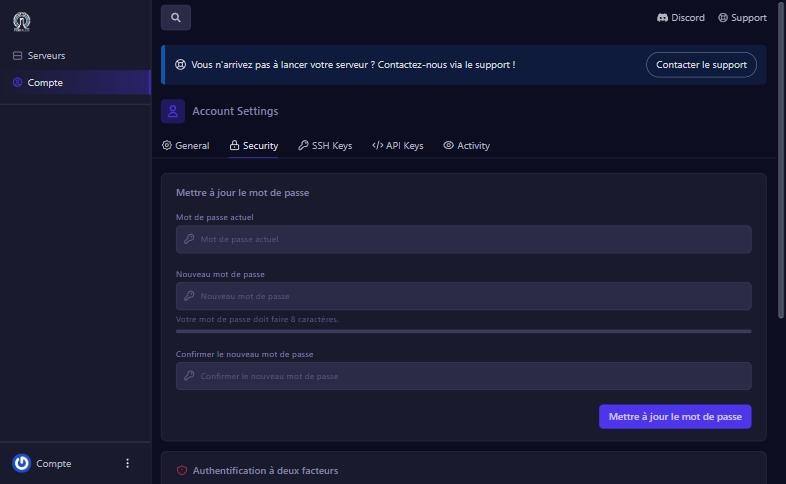
  • Mettre à jour le mot de passe (update password): enter the current password, the new one (8 characters minimum) and its confirmation. Pick a long, unique password.
  • Authentification à deux facteurs (two-factor authentication): the Activer la vérification en deux étapes button starts setup with an authenticator app. Turn it on: even if someone steals your password they cannot get in.
  • Session History: the list of sign-ins (system, browser, IP address, date). If you see one you do not recognise, change your password right away.
Security tab
Security tab
4

SSH keys and API keys

  • SSH Keys (Create SSH Key): to connect by SFTP with a key instead of a password. There are none until you create one.
  • API Keys (Create API Key): for tools or scripts that drive the panel for you. An API key gives real access to your account: do not share it and delete it when it is no longer used.
5

Read the activity log (Activity)

The Activity tab lists actions on the account: sign-in (auth:success), user creation, with the user, IP address and date. It is where to check who did what.

If it does not work

I forgot my password

use the reset link on the sign-in page, or contact support.

I only see English

change the Langue du panneau in the General tab.

I lost my authenticator app

contact us before closing your session, to recover access.

A suspicious sign-in shows in the history

change the password, turn on 2FA and delete unused API keys.

Questions? Get in touch

Our team will answer by message or on Discord.

No game server yet?

Launch yours in minutes. €1 = 1 GB.

Browse our games