
you understand what the “Variables” screen is for and how to store a secret (bot token, API key) without writing it in your code.
DISCORD_TOKEN. It lives in a .env file rather than in the code, so you do not publish it by mistake.Variables menu (Manage section). The list shows one key and one value per row; it says “No variables found” until you create one. Two buttons: Add Variable and Create Backup.
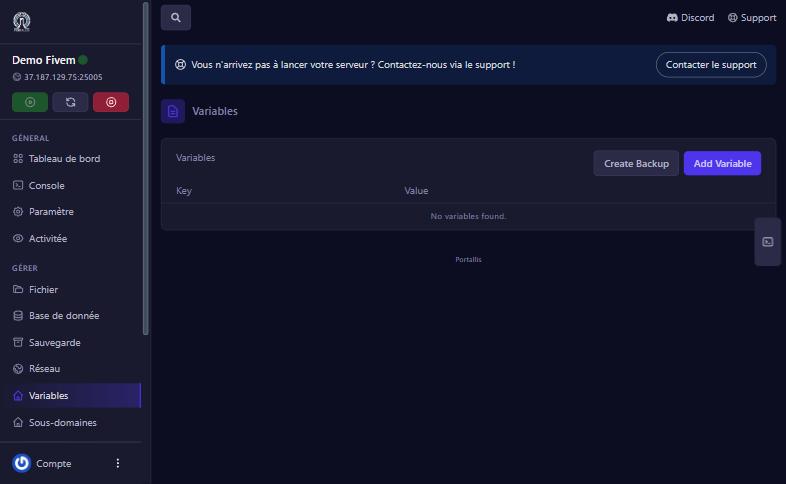
Click Add Variable. The “Add/Edit Variable” window asks for:
.env, .env.development, .env.production and .env.local. For a live bot, use .env.DISCORD_TOKEN).Then Add Variable.
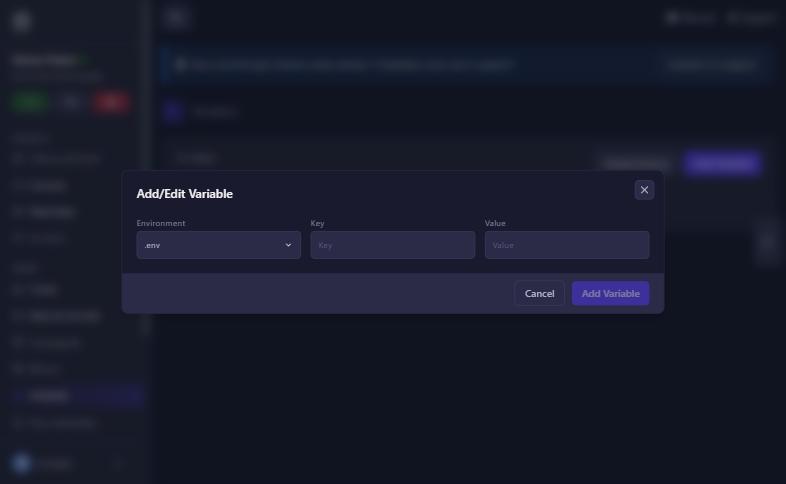
In your code, read the variable instead of hard-coding it: in Node.js process.env.DISCORD_TOKEN, in Python os.environ["DISCORD_TOKEN"]. Then restart the server so it takes effect.
check the exact name (capitals included), the file chosen in Environment, and restart the server.
the value is incomplete or expired; copy the whole token again.
it appears in every server’s menu, but only matters for apps that read a .env.
Our team will answer by message or on Discord.