
you know what each card on the “Paramètre” (Settings) screen does and which ones to handle with care.
The Détails SFTP card gives the server address (like sftp://node.portallis.com:2022) and your username. The password is your panel account password. The Lancer SFTP button opens your SFTP software (FileZilla, WinSCP…) already filled in. SFTP is for sending or fetching many files at once.
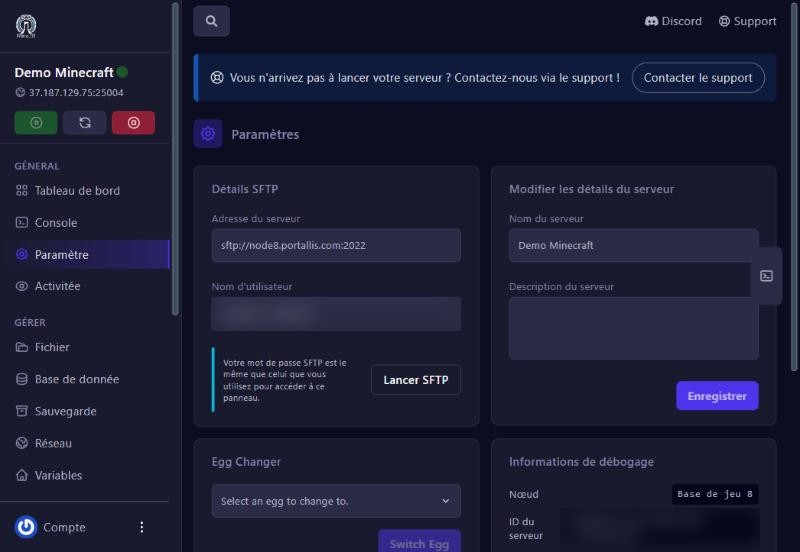
Modifier les détails du serveur: change the name and description shown in the list, then Enregistrer (save). The Server Icon card (Upload Icon) sends an image shown in the list and on the server page.
The Egg Changer card turns the server into another game from the catalogue (Minecraft, Rust, Palworld, a Discord bot…). Pick the game in the list, then Switch Egg. Careful: this is a deep change; back up first and check your plan suits the new game.
The Informations de débogage card gives the node (the machine hosting your server) and the server ID. Give both to support when you contact us: they speed up the diagnosis.
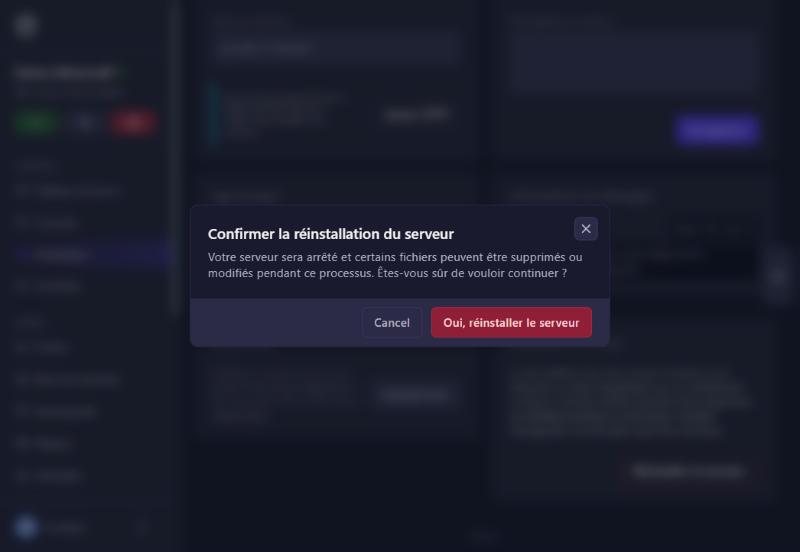
The Réinstaller le serveur card stops the server then reruns its original install script. Some files may be deleted or changed. A confirmation window appears; you can close it with Cancel and nothing happens.
check the address and port 2022, the full username, and your account password (not a game password).
open the Console and read the last error, or contact support with the server ID.
restore your last backup (see the backups guide).
Our team will answer by message or on Discord.