
you find out who started, stopped or changed your server and when, to understand a problem or watch your subusers.
Activitée (Activity) menu (General section). The most recent actions are at the top. The Event column gives the action type in the form server:power.start.
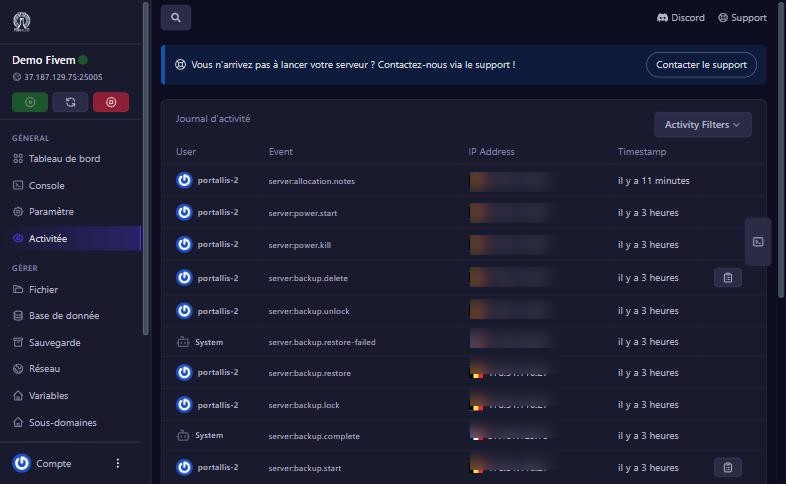
These are the ones we saw while testing:
server:power.start, server:power.kill: server start, forced stop.server:backup.start, server:backup.complete: creating a backup (the user starts it, “System” completes it).server:backup.lock, server:backup.unlock, server:backup.delete: lock, unlock, delete.server:backup.restore and server:backup.restore-failed: a restore request, then its possible failure (see below).server:startup.edit: a startup variable was changed.server:database.create: a database was created.server:allocation.notes: a note on a port was changed.The Activity Filters button narrows the list (by event type or by user). To understand a problem, find the time it began and look at what happened just before: a forced restart, a startup variable change, a restore. To watch a subuser, look for their name in the User column.
An unusual IP address or country, or an action nobody made (a backup deleted, a database created), should alert you: change your password, turn on two-step verification and remove unneeded access. The account log (Compte > Activity) shows sign-ins.
no action has been made from the panel on this server yet.
the log only covers the panel; for the game, use the Console.
the restore did not complete. Check the server’s state in the console, restart it if needed, then contact us with the event’s time.
it may be your internet provider (changing address), but if in doubt, change your password.
Our team will answer by message or on Discord.